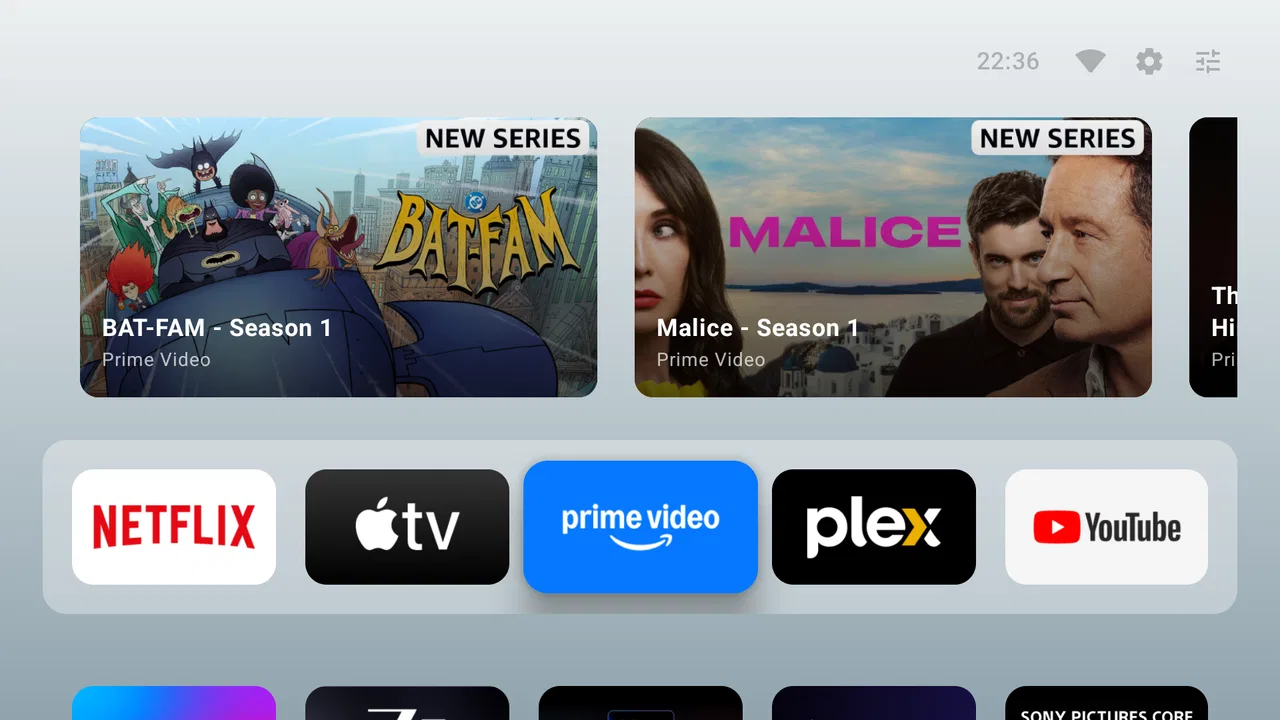
AT4K Launcher
- 4.8
- Rating
- 50.00K
- Installs
- Free
- Price

 Analysis by App-foxy
I installed AT4K Launcher expecting a focused way to make an Android TV home screen feel less cluttered, and that is exactly the kind of experience it aims to provide. It comes from Cute Little Apps and sits in the Personalization category, with a straightforward purpose: replace a busy television interface with a cleaner starting point for launching apps. I found the appeal less about adding entertainment features and more about reducing the number of distractions between turning on the TV and opening what I actually want to watch.
That distinction matters. This is not a streaming service, media player, remote-control replacement, or content subscription. It is a launcher, so its value depends on how much you want to change the first screen you see on an Android TV device. If your current interface already feels comfortable, the difference may be modest. If you regularly hunt through rows of recommendations, unused apps, or manufacturer additions, a simpler layout can make the television feel much easier to operate.
A cleaner starting point for Android TV
I look at the home screen as the part of a TV I use before the actual viewing begins, so a launcher succeeds for me when it makes that transition feel clear rather than adding more to browse. With AT4K Launcher, the useful question is not just whether the layout looks calmer, but whether it remains easy to use with the remote and familiar to everyone sharing the screen. That makes everyday navigation the best place to start.
You May Also Like

 Blood Strike: 2.5 Anniversary
Blood Strike’s Loadouts Turn Every Drop Into a Tactical Gamble
A close look at Blood Strike’s custom loadouts: how fast access to signature weapons reshapes its battle royale rhythm, rewards preparation, and narrows the gap between fights.

 Pandora - Music & Podcasts
Pandora’s Music Is Easy to Start, but Harder to Recover
Pandora’s strength is its low-effort path from a seed to a station. Its weak spot is how much confidence it asks you to place in connection, setup, and quiet recovery.

 8 Ball Pool
8 Ball Pool Is Built on Rivalries, Rematches, and Routine
A close look at the rivalries, rematches, shared routines, and unanswered safety questions that turn a quick pool match into a persistent mobile community.

 Samsung Music
Samsung Music’s Quiet Strength Is Playing What You Already Own
Its reach comes less from spectacle than from dependable access to a personal library. That simplicity is both the app’s strongest retention engine and its ceiling.

 AccuWeather: Weather Radar
AccuWeather Review: A Quick, Clear Forecast for Everyday Decisions
For everyday plans, the best forecast is the one you can understand quickly. AccuWeather makes rain timing, radar, and local conditions easy to act on, with a few trade-offs.

 Hill Climb Racing
Why Hill Climb Racing Still Turns Crashes Into One More Run
A tiny car, a bumpy hill and one more upgrade: Hill Climb Racing keeps resurfacing because its simple chaos makes every near-miss feel personal.
More From Our News Desk



What AT4K Launcher changes in everyday use
The most useful way to think about this app is as a front door for your TV. Instead of treating the home screen as a place for endless discovery, it emphasizes direct access to the apps you already use. That approach suits people who know what they want to watch before they pick up the remote. I generally prefer opening one familiar service immediately rather than navigating through promotional panels and recommendations first, so the design idea makes sense to me.
The store summary describes it as a clean and simple Android TV launcher, while the short description identifies it as AT4K Launcher. Those words set a realistic expectation: simplicity is the main attraction. I would not choose it because I wanted a large collection of customization tools or a dramatic visual makeover. I would choose it because I wanted the home screen to stay out of the way.
That also makes the app particularly relevant for a second television, a bedroom setup, or a device shared by people who do not want to learn a complicated interface. A minimalist launcher can be easier for a family member who only needs a few recognizable destinations. It can also help in a guest room, where a short, understandable list of apps is more useful than a personalized feed filled with someone else’s viewing history.
The practical setup question
Before installing any alternative launcher, I would first check whether the Android TV device allows it to become the default home experience. That is not a criticism aimed specifically at this app; it is an important part of using launchers on television hardware. Some manufacturers make their own home screen difficult to replace, and system updates can affect how the Home button behaves. The app can still be worth trying, but the smoothest experience depends on the device as well as the launcher.
I would also keep the original launcher available during the first test. That gives you an easy fallback if the new layout does not suit your remote, your household, or your television’s navigation habits. My preferred workflow is simple: install it, open the apps I use most, press Home repeatedly, and see whether the new starting point feels natural after several ordinary sessions rather than judging it after one glance.
This is one of the less obvious trade-offs with a launcher. A screen can look cleaner while still taking more effort to navigate if its focus movement does not match your expectations. On a phone, I can tap around quickly. On a TV, directional-pad behavior matters much more. I would pay attention to how easily I can move between app choices, return to the first item, and recover after opening an app and pressing Back.
What the free access means
AT4K Launcher is free to install, which makes testing it relatively low risk. The listing also shows in-app purchases priced at $4.99 per item. I would therefore separate the decision into two parts: whether the free experience improves your television, and whether any optional purchase offers enough extra value for your particular setup.
The free entry point is its strongest financial advantage because a launcher is highly personal. You may love the reduced clutter, or you may discover that your television’s built-in interface already does everything you need. Being able to try the basic experience before spending money is important here. I would not treat the presence of an optional purchase as a reason to pay immediately; I would first live with the free version and identify a specific problem that a paid item solves.
The listed purchase price is clear, but the practical value of an individual item depends on what you want from the launcher. If your goal is simply a cleaner home screen, the free installation may already answer that need. If you are looking for deeper personalization, you should decide whether the available paid addition changes your daily workflow or merely makes the interface look different. A visual change can be pleasant, but it is not automatically useful.
Where the value comes from
The value here is measured in reduced friction rather than in a large feature count. A launcher earns its place when it helps me reach a familiar app with fewer decisions. That can be surprisingly meaningful on a television, where typing is slow, remotes are limited, and small interface annoyances become repetitive very quickly.
Consider an ordinary evening. I turn on the TV after dinner, want to open one streaming app, and do not need recommendations, news panels, or a rotating collection of promoted content. A focused launcher can make that routine feel more deliberate. The benefit is not that it gives me something new to watch; it is that it keeps the path to my existing apps short and visible.
There is also value in predictability. A simple home screen is easier to explain to another person than a changing content feed. If I want a visitor or family member to open a particular app, I can point to a stable starting layout instead of describing several rows and banners. That makes AT4K Launcher more interesting as a shared-device tool than as a personalization toy for one individual.
Another useful workflow is separating a television’s purpose from the owner’s broader account activity. On a main living-room TV, recommendations and multiple profiles may be helpful. On a screen used mainly for a handful of services, they can become noise. A launcher built around direct access is better suited to the second situation. It is a choice between discovery and control, not an upgrade that is automatically better for everyone.
Where it may feel limited
The same simplicity that makes this app attractive can make it feel restrictive to users who expect a launcher to behave like a full customization suite. If you want elaborate themes, extensive widgets, complex sorting, or a highly personalized content dashboard, a more feature-heavy alternative may be a better match. I would not install this expecting it to turn an Android TV into a completely different operating system.
There is also a possible adjustment period for households that enjoy recommendation-heavy home screens. A clean launcher may remove visual prompts that sometimes help people discover new shows or remember which services they have installed. If your viewing habit begins with browsing rather than choosing a known app, reducing the home screen to essentials could feel less helpful.
Remote navigation is another practical consideration. A launcher that looks excellent in a screenshot can still be frustrating if focus indicators are subtle or if the order of items does not fit the way you use the directional pad. I would test it in low light, from the usual seating position, and with the same remote everyone in the home uses. That catches usability problems that are easy to miss during setup.
Finally, a launcher is not the right tool for every Android TV complaint. If the real issue is slow streaming, weak Wi-Fi, an aging device, or an app that crashes, changing the home screen will not fix the underlying problem. It may make the first few seconds of using the TV calmer, but it cannot improve the performance of the services you launch.
How it compares with the built-in alternative
The built-in launcher has one obvious advantage: it is already integrated into the device. Its Home button behavior, system prompts, account connections, and manufacturer controls are designed to work together. For someone who values maximum compatibility and does not mind the existing layout, staying with the default is the sensible choice.
AT4K Launcher makes more sense when the default interface feels too busy or too promotional. Its appeal is not a promise of more content; it is a different priority. Instead of asking the home screen to recommend, advertise, organize, and launch everything at once, it focuses on getting you to your apps. That can feel faster even when the underlying hardware has not changed.
Compared with a more elaborate third-party launcher, this app appears positioned toward people who want restraint. A feature-rich competitor may offer more control, but every extra setting creates another decision and another chance for the layout to become difficult for other household members. I would choose AT4K Launcher when consistency and clarity matter more than endless tweaking.
That comparison also explains why the app will not impress everyone equally. A power user who enjoys rebuilding the home screen may quickly reach the limits of a deliberately simple design. Someone who wants a calm, recognizable dashboard may appreciate not having to configure dozens of options. The best choice depends on whether customization means “remove distractions” or “control every visual detail.”
Who is most likely to benefit
I see the strongest fit for Android TV owners who use a small group of familiar apps and dislike scrolling through content they did not request. It is also a reasonable candidate for shared televisions, older users who prefer a direct route to known services, and secondary screens where a full recommendation dashboard feels unnecessary.
It may be especially useful after reorganizing a household’s viewing habits. For example, if you have cancelled several services but the old home screen still presents their icons or suggestions, a simpler launcher can help the device reflect how you actually watch television now. The improvement comes from removing irrelevant choices, not from adding another layer of content.
I would be more cautious for people who rely heavily on voice search, multiple user profiles, or manufacturer-specific home-screen features. Those users should test the interaction carefully before making the launcher their everyday starting point. The question is not whether the screen is attractive; it is whether the launcher preserves the shortcuts and habits that make your particular TV convenient.
It is also worth considering who else uses the device. A layout that feels wonderfully minimal to me might confuse someone who expects the original home button behavior or recognizable recommendation rows. I would install it on a personal or secondary TV first if the main living-room screen is shared by several people with different preferences.
What the published details suggest about maturity
The app has a 4.8 average from over eight hundred ratings and has passed fifty thousand installs, which suggests that its focused approach has found an audience. Those figures are encouraging, but I would still treat them as a starting point rather than a guarantee that it will suit every television model. Launcher behavior is unusually dependent on hardware, Android TV interfaces, and remote controls.
Cute Little Apps lists the current version as 1.2, and the app supports Android 8.1 or later. That relatively broad system requirement makes it relevant to some older Android TV hardware, not only newer devices. Even so, compatibility on paper is not the same as identical behavior across manufacturers, so my advice remains to test the Home button, directional navigation, and return path before committing to it.
The content rating is Everyone, which fits the app’s role as a general personalization utility. It is not a game or a media catalog, and the age rating should not be the deciding factor for most buyers. The more important questions are whether the interface suits your household and whether the free experience removes enough friction to justify replacing the default launcher.
My buying recommendation
I would start with the free version and judge it by one simple measure: how many steps and distractions stand between pressing Home and opening the app I intended to use. If the answer improves and everyone who uses the TV can navigate it comfortably, AT4K Launcher delivers worthwhile value without requiring an immediate purchase.
I would consider a $4.99 in-app item only after identifying a concrete need that the free setup does not meet. Paying for a feature because the price seems modest is not the same as receiving value. For this kind of app, the right purchase is the one that removes a recurring annoyance, not the one that adds decoration you will stop noticing after a week.
My verdict is to try it, not blindly replace everything with it. AT4K Launcher is a sensible choice for viewers who want a calm, direct Android TV home screen and do not need an elaborate customization playground. It is less suitable for people who depend on rich recommendations, deep manufacturer integration, or advanced launcher controls. In my experience, its strongest argument is wonderfully practical: when I already know what I want to watch, the launcher should help me get there and then disappear from the way.
FAQs for AT4K Launcher
01What is AT4K Launcher, and what does it do?
AT4K Launcher is an Android home-screen replacement designed to give users an alternative way to organize and access apps. Instead of relying on the phone manufacturer’s default interface, it provides its own launcher environment, including app access, shortcuts, and customization options. Its usefulness depends on your device and Android version, so checking compatibility before installation is recommended.
02Is AT4K Launcher compatible with every Android phone?
Compatibility can vary depending on your Android version, device manufacturer, screen resolution, and system restrictions. AT4K Launcher may work normally on many Android phones, but some features can behave differently on heavily customized interfaces such as Samsung One UI, Xiaomi HyperOS, or other manufacturer software. Before downloading, review the store requirements and confirm that your device supports changing the default launcher.
03Does AT4K Launcher affect phone performance or battery life?
As with any launcher, AT4K Launcher runs as part of the home-screen experience and may use a small amount of memory and battery in the background. On newer devices, the impact is generally modest, but older or entry-level phones may feel slower if the launcher includes animations, widgets, or additional visual effects. If performance changes, reducing effects or returning to the original launcher may help.
04Is AT4K Launcher safe to install and use?
The safest way to install AT4K Launcher is through a trusted official app store or a verified developer source. Before installation, check the developer name, recent reviews, update history, and requested permissions. A launcher normally needs access related to displaying the home screen and opening applications, but unexpected permissions should be treated carefully. Avoid unofficial modified APK files, which may contain unwanted software.
05Can I uninstall AT4K Launcher and return to my previous home screen?
Yes, in most cases you can stop using AT4K Launcher and return to the phone’s original home screen. Open Android Settings, go to the Apps or Default Apps section, select the Home app or Launcher option, and choose the manufacturer’s launcher. You can then uninstall AT4K Launcher like any other application. Your installed apps should remain, although launcher-specific layouts or shortcuts may not transfer.
Pros
- Sharp 4K-ready visuals make supported wallpapers and icons look impressive.
- Highly customizable layouts let users tailor the home screen to their style.
- Organized app access can make large app collections easier to navigate.
- Lightweight design keeps the interface feeling clean and uncluttered.
- Useful for users who want a TV-style launcher on compatible Android devices.
Cons
- Some features may depend on device resolution or Android compatibility.
- Customization options can take time to learn for first-time launcher users.
- Limited value on phones without 4K displays or large-screen setups.
- Third-party icon and wallpaper support may not be equally consistent.
- Changing the default launcher can require extra setup in Android settings.

AT4K Launcher
Gallery